


Redesigning a website means changing the look, feel, and structure of your existing site, without necessarily changing the domain. When businesses choose to redesign a website, the reasons vary: a dated visual identity, a platform migration, a shift to mobile-first layouts, or a full rebrand. Whatever the reason, the concern is the same. Will the redesign erase years of SEO progress?
At Wisitech, a trusted website redesign company with experience across industries and markets, we answer that concern directly: no, it does not have to. A well-planned redesign preserves your rankings, improves your Core Web Vitals, and positions your site for stronger performance in 2026’s search landscape, including AI Overviews and multimodal search.
This guide covers exactly how our team approaches every website redesign services project so nothing is left to chance.
1. Protect your SEO before touching a single page
The first step when you redesign a website is to treat your current SEO footprint as an asset to be preserved, not discarded. If your site is even a year old and has been actively optimized, you have accumulated authority, backlinks, indexed pages, and ranking signals that took significant time and effort to build.
Throwing all of that away by launching a brand-new site from scratch would mean starting over in Google’s eyes, losing traffic, and losing revenue in the transition period.
Here is what must be protected:
URL structure: Every URL that ranks or receives backlinks must either be preserved exactly or mapped to a redirect. There is no middle ground. A URL change without a 301 redirect is an SEO erasure.
Content and meta tags: Your existing page titles, H1 headings, meta descriptions, and body content carry ranking signals. Ask your website redesign company to document every page’s existing metadata and carry it forward into the new design, with improvements where needed.
Internal linking structure: The way pages link to each other passes authority. Rebuilding a site without auditing internal links breaks that flow.
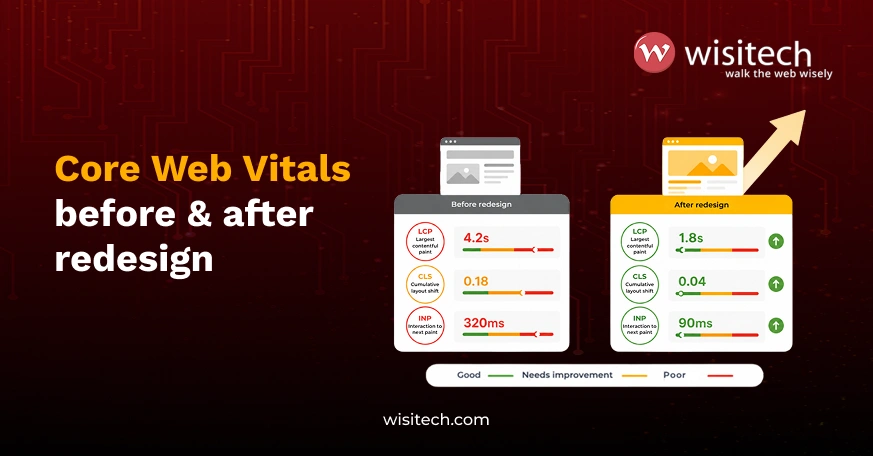
Core Web Vitals baseline: Before the redesign begins, run a Lighthouse or PageSpeed Insights report on your current site and note your LCP, CLS, and INP scores. These become your benchmarks. Any redesign that worsens these scores without a remediation plan is a step backward, not forward.
2. Crawl the website to understand its structure before you redesign a website
You cannot improve what you have not mapped. Before any design or development work begins, your team needs a complete picture of your existing site architecture.
Tools like Screaming Frog, Sitebulb, Visualping, ContentKing, and Hexometer crawl your site and surface the data you need: every URL, every internal link, every image, every redirect, and every broken element. This crawl data becomes the foundation of your redesign roadmap.
What to extract from your crawl:
Full URL inventory: Every page on the site, its status code, its depth from the homepage, and its current indexation status. Pages on page one of Google that are buried four clicks deep in the navigation need to be promoted in the new architecture.
Inbound link map: Which pages receive the most external backlinks? Those are your highest-priority pages. A redesign that changes or removes those URLs without proper redirects destroys link equity you cannot recover quickly.
Redirect chains: Many sites accumulate redirect chains over years; for example, URL A redirects to URL B, which redirects to URL C. A redesign is the right moment to clean these up and point everything to the final destination directly.
Crawl budget waste: Identify pages that are being crawled but should not be (thin pages, parameter URLs, duplicate content) and plan to exclude them in the new robots.txt or via canonical tags.
3. Audit your website thoroughly
Crawling tells you what exists. Auditing tells you what is working and what is not. A comprehensive audit before a redesign gives you a clear brief: what to carry forward, what to fix, and what to leave behind.
Here is the full audit checklist:
Page titles: Are they missing, duplicated, or poorly written? Titles should be between 200 and 512 pixels wide (roughly 50 to 60 characters). Every title must include the target keyword and a clear value proposition.
H1 tags: Each page should have exactly one H1 that aligns with the page title and target keyword. Missing or duplicated H1 tags are a Rank Math red flag and a content signal problem.
Meta descriptions: Missing or duplicated meta descriptions reduce click-through rates from search results. Every page needs a unique, compelling meta description under 160 characters.
Canonical tags: Check for canonicalization errors. Duplicate content without proper canonical tags dilutes your ranking signals across multiple URLs.
Broken internal and external links: Every broken link is a dead end for both users and crawlers. Document all broken links and plan their replacements before the new site launches.
Image alt texts: Every image needs alt text under 125 characters that describes the image and includes the focus keyword where relevant. Post-Google I/O 2026, alt text is treated as body content by multimodal search systems, not as an accessibility afterthought.
XML sitemap: Is it current, accurate, and submitted to Google Search Console? The new site’s sitemap must be regenerated and resubmitted on launch day.
Robots.txt: Review what is currently blocked. The redesign may change your folder structure, so the robots.txt must be updated to reflect the new architecture, not the old one.
Duplicate or thin content: Pages with fewer than 300 words, pages that duplicate each other, or pages with boilerplate filler all hurt overall site quality. Plan to consolidate, expand, or remove them.
Google Search Console performance data: Which pages drive the most impressions and clicks? Which queries trigger your content? This data tells you which pages must be preserved exactly and which can be restructured.
URL structure audit: Are URLs clean, descriptive, and keyword-rich? A redesign is the right moment to fix ugly or parameter-heavy URLs, as long as you implement 301 redirects from every old URL to every new one.
4. Redesign and re-audit: Apply 2026 migration best practices
Once you have completed the audit and have a clear redesign brief, the development and design work begins. But the work does not end at launch. A re-audit after go-live is as important as the original audit.
Implement 301 redirects before launch, not after. Every URL that is changing needs a redirect in place on day one. Use your URL inventory from Step 2 to build a redirect map. Test every redirect before the site goes live. A broken redirect on a page with significant backlinks can cost you rankings you may not recover for months.
Carry over all metadata to the new CMS. If you are migrating platforms, for example from WordPress to Webflow, or from an old custom build to a new one, export all existing titles, meta descriptions, canonical tags, and structured data and re-import them into the new system before launch.
Preserve or improve Core Web Vitals. Compare your pre-redesign Lighthouse scores against the new site on a staging environment. If your LCP (Largest Contentful Paint) was 2.1 seconds on the old site and it is 3.8 seconds on the new staging site, that is a problem to fix before launch, not after. Work with your developers on image optimization, lazy loading, server response times, and layout stability.
Update your XML sitemap and submit it immediately on launch day. Do not wait for Google to discover the new site structure on its own. Go into Google Search Console, remove the old sitemap if the URL structure has changed, and submit the new one.
Monitor Search Console for 48 to 72 hours post-launch. Look for sudden spikes in 404 errors (missed redirects), coverage drops (pages being deindexed), and Core Web Vitals regressions. Catch problems in the first week, not the first month.
Recheck image alt texts and file names in the new CMS. Platform migrations frequently strip alt text or reset image filenames to generic strings. After launch, run a fresh crawl specifically looking for images missing alt text.
Test structured data. If your site uses schema markup (LocalBusiness, FAQ, Article, Product), verify that it transferred correctly to the new site using Google’s Rich Results Test. Missing or broken schema costs you rich snippet eligibility.
A smarter way to redesign a website without sacrificing SEO
A decision to redesign a website should never feel like a gamble with your SEO. With the right process, the right team, and the right tools, a redesign becomes an opportunity to strengthen your rankings, improve user experience, and align your site with the demands of 2026 search, including AI Overviews, Core Web Vitals, and multimodal indexing.
Wisitech is a custom website design company that combines design, development, and SEO expertise under one roof. Whether you need a full platform migration or a focused visual refresh, our team ensures your SEO equity is protected at every stage.
Tell us your current platform, your redesign goals, and your go-live timeline, and we will build you a migration plan that keeps your rankings intact. Get in touch with us for a free redesign and SEO consultation.