

Running a small business or agency is already a marathon. Between managing clients, delivering projects, handling operations, and growing, keeping up with a social media content calendar can feel overwhelming. Yet social media remains one of the most affordable and reliable ways to connect with customers, build trust, and stay visible online.
This is where AI prompts come in.
A good social media prompt can help you plan, write, design, and organize content faster than ever, so you stay consistent without spending hours every week. With the right system, small businesses can create professional content even with small teams and tight schedules.
This guide gives you clear prompts, explanations, and real examples so you can automate your workflow, create better content, and free up time for what actually matters.
It’s designed for small business owners, agencies, and lean teams who want consistent, high-quality social media without adding operational complexity.
Struggling to stay consistent on social media?
Wisitech helps automate your social media calendar with smart AI workflows.
Get a free consultation
Why small businesses struggle with social media (And how prompts help)
Most businesses run into the same problems:
Planning feels stressful
You sit down to create content, and your mind goes blank. You jump between ideas with no direction.
Posting becomes inconsistent
A few busy days turn into empty weeks. Your audience forgets you, and engagement drops.
Everything takes too long
Writing captions, finding ideas, designing graphics, creating videos, it all eats into your week.
You’re unsure what your audience wants
You end up guessing instead of following a plan.
Visuals feel like the hardest part
You want your posts to look clean and professional, but design takes time and can get expensive fast. This is where prompts change everything.
Prompts give AI clear instructions, so instead of staring at a blank screen, you get organized, ready-to-use ideas in seconds. No more guessing, no more starting from scratch, just a simple system that delivers consistent output every time.
Strong, reliable content comes from using the right prompts repeatedly. The more intentional your prompts, the easier it becomes to plan, create, and publish without stress.
Why prompts give you a competitive edge
Prompts turn AI into a smart assistant that understands your goals. Here’s why they’re valuable:
They save hours every week
Instead of brainstorming for 3 hours, you get 30 ideas in seconds.
They improve content quality
You get clearer, sharper, more polished ideas, without hiring extra help.
They create consistency
Prompts give you a repeatable workflow that keeps your brand active.
They help you stay updated
When combined with fast research tools, prompts keep your content timely and relevant.
They work for multiple platforms
One prompt can produce content for Instagram, TikTok, LinkedIn, Facebook, and more.
They reduce creative frustration
The hardest part, getting started, is now handled for you.
This is especially helpful for businesses with small teams who need the biggest results from the smallest amount of time.
Looking for help turning these prompts into real results?
Unlock smarter content workflows with Wisitech’s AI-powered social media strategies.
Schedule a Free Consultation
How to structure your social media calendar before using prompts
Before using prompts, you need a simple structure so the AI knows what direction to follow.
-
Content pillars
Content pillars are themes you regularly post about. They help you stay focused and avoid random content. Examples:
- Tips and tutorials
- Behind-the-scenes
- Promotions
- Customer stories
- Industry insights
Clear pillars help your social media marketing calendar stay organized and meaningful.
-
Content distribution
Choose:
- How often do you want to post
- Which platforms matter most
- What type of content fits each platform
This helps AI tailor ideas for each channel rather than giving general suggestions.
-
Best posting times
Every audience has habits.
Knowing when your audience is online helps your posts reach more people.
Once this structure is ready, prompts become much more powerful.
Important note: General posting times are only a starting point. Small businesses should refine timing using their own platform analytics after posting consistently for a few weeks, as performance varies by audience, platform, and content type.

ChatGPT prompts to build your monthly social media calendar
Below are easy prompts with explanations so you know why each one matters.
Prompt 1: Build content pillars
Exact prompt
You are a content strategist for small businesses.
I run: [BUSINESS]
My audience is: [AUDIENCE]
My 90-day goals: [GOALS]
Create 4–5 content pillars with:
– Why it matters
– 3–4 post ideas
– Posting frequency
– Best platforms
– How it supports my goals
Why this helps
This sets the foundation for the entire month. Instead of random ideas, you get strategic themes that support your goals, whether that’s more sales, brand awareness, or engagement.
Prompt 2: Build a 30-day content plan
Using the content pillars we created, build a detailed 30-day content plan for [PLATFORM].
For each day, include these columns (Google Sheets–ready):
- Date
- Content Pillar
- Content Type (Reel, Carousel, Image, Story, Short Video, etc.)
- Caption (80–90 words, engaging, easy to read, includes a hook)
- Catchy Graphic Text (6–10 words)
- Best Posting Time
- Hashtags (4–5 relevant hashtags)
- CTA (example: Save, Follow, Share, Click link in bio, Comment)
Rules:
– Captions must sound conversational, not robotic
– Rotate content types
– Spread pillars evenly
– Keep graphic text bold and scroll-stopping
– Use a healthy mix of niche and mid-sized hashtags
– Format output as a clean table for Google Sheets
Why this prompt is powerful
It produces ready-to-post content, not just ideas.
Your team doesn’t waste time rewriting or reformatting anything.
It makes your monthly content calendar for socials feel plug-and-play.
Ready to bring your full content planning system to life?
Wisitech’s data-driven content calendars and automation solutions help you grow faster and stay organized.
Get Your Free Consultation
Prompt 3: Generate captions that match your brand voice
Write 8 captions for [BUSINESS] in the tone: [VOICE].
Each caption:
– Starts with a hook
– Is 80-90 words
– Includes a CTA
– Uses relevant keywords
Topics:
- [TOPIC 1]
- [TOPIC 2]
…
Why this prompt improves your workflow
Captions can be the most time-consuming part of content creation. This prompt gives you multiple strong starting points, saving hours while keeping messaging consistent and engaging.
Turn prompt-based planning into real performance.
Wisitech’s social media experts can help you implement your content strategy and unlock better engagement, reach, and ROI.
Connect Now for Personalized Guidance
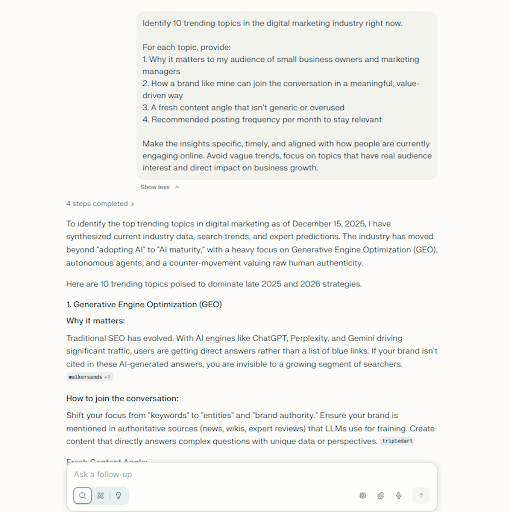
Use perplexity for fresh ideas and competitor insights
Perplexity makes it easy to see what audiences are actually talking about right now. Instead of guessing which topics matter, you get real-time clarity that keeps your content timely and relevant.
Identify 10 trending topics in [INDUSTRY] right now.
For each topic, provide:
- Why it matters to the audience
- How a brand can join the conversation in a meaningful, value-driven way
- A suggested content angle that feels fresh and engaging
- Recommended posting frequency for covering this topic (per month)
Make the insights specific, actionable, and aligned with current online conversations and audience behavior.
Prompt 5: Analyze competitors smartly
Look at the top 3 competitors for [BUSINESS TYPE].
Tell me:
– Their main content themes
– What posts perform the best
– Their posting frequency
– Gaps I can fill
– Tips to stand out
Why is this beneficial?
Instead of copying competitors, you identify what works and what’s missing. This helps you create content that differentiates your brand and captures attention.
This analysis improves the quality of your next social posting plan.
Why this works
This prompt turns trend research into clear, ready-to-use content ideas that fit directly into your calendar and help you stay aligned with what people care about.
Write better, friendlier posts with Claude
Better writing means stronger engagement and more conversions.
Prompt 6: Create a friendly promotional post
Write a friendly promotional post about [OFFER] for [AUDIENCE].
Include:
– A benefit-first hook
– A relatable pain point
– A helpful tone
– A soft proof line
– A clear CTA
Why this prompt works
It avoids sounding too “salesy” while still encouraging action. It frames your offer as something genuinely helpful.
Prompt 7: Rewrite one message for all platforms
Rewrite this message for:
– TikTok
– X
Message: [INSERT MESSAGE]
Make each version feel natural for the platform.
Why does this improve content quality?
Different platforms have different cultures. This prompt ensures your message fits each one: professional on LinkedIn, punchy on Instagram, playful on TikTok.
Create visuals using AI (Expanded with clear example prompts)
Visuals are often the hardest part for small businesses, especially when they don’t have designers.
These prompts make visual creation fast and repeatable.
Prompt 8: Product shot concepts
Why this helps
- Helps you create product photos without a photographer
- Gives you consistent brand visuals
- Makes your content look high-quality
- Saves time and money
Exact rompts
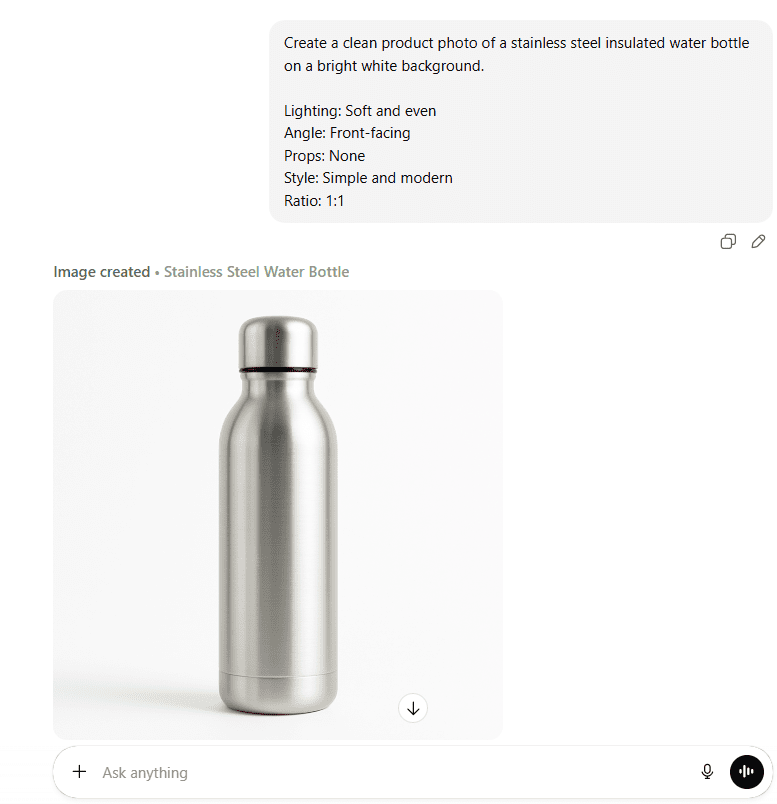
Prompt A – Clean studio shot
Create a clean product photo of [PRODUCT] on a bright white background.
Lighting: soft and even
Angle: front-facing
Props: none
Style: simple and modern
Ratio: 1:1
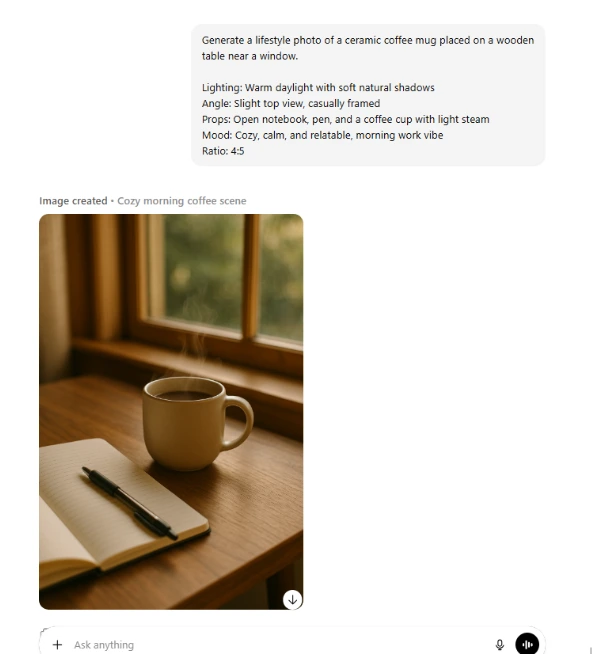
Prompt B – Warm lifestyle shot
Generate a lifestyle photo of [PRODUCT] on a wooden table.
Lighting: warm daylight
Angle: slight top view
Props: coffee cup, notebook
Mood: cozy and relatable
Ratio: 4:5
Prompt C – Flat lay
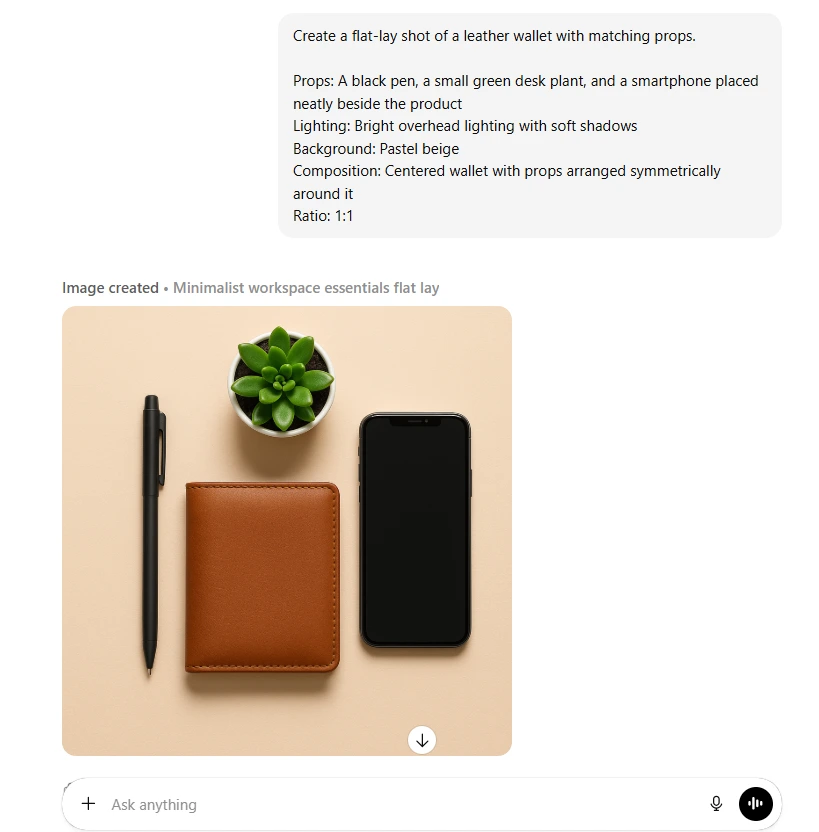
Create a flat-lay shot of [PRODUCT] with matching props.
Props: pen, small plant, phone
Lighting: bright overhead
Background: pastel beige
Composition: centered
Ratio: 1:1
Prompt D – Close-up detail
Create a close-up detail shot of [PRODUCT] that shows texture.
Lighting: soft side lighting
Background: blurred neutral
Angle: macro close-up
Ratio: 4:5
Prompt E – Product + packaging
Create a photo of [PRODUCT] next to its packaging.
Lighting: bright studio
Background: soft grey
Angle: 45 degrees
Mood: clean and premium
Ratio: 1:1
These visual prompts help you create consistent, professional-looking visuals without relying on a designer.
Prompt 9: Graphic design ideas for social media (Exact prompts)
Why this helps
Many small businesses struggle with creating professional-looking graphics and visuals because design skills take time to learn, and hiring a designer can be expensive. These prompts remove that barrier completely. By giving clear instructions on layout, color, and structure, they help generate polished visuals in seconds.
You can paste any of these prompts directly into ChatGPT or Gemini Nano Banana to instantly create graphics that look clean, modern, and on-brand, without needing design experience or a paid design team.
PROMPT 1 – Bold headline layout
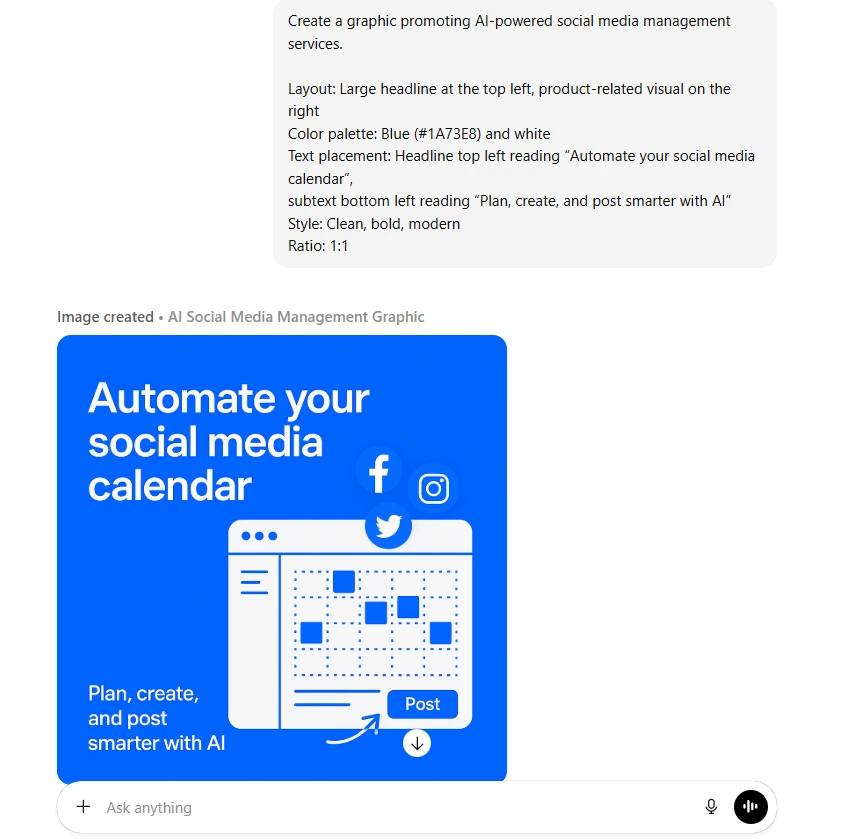
Create a graphic promoting [OFFER].
Layout: Large headline at the top left, product image on the right
Color palette: Blue (#1A73E8) and white
Text placement: Headline top left, subtext bottom left
Style: Clean, bold, modern
Ratio: 1:1
PROMPT 2 – Minimal quote layout
Create a minimalist graphic for [OFFER].
Layout: Centered large text in the middle
Color palette: Black and light grey
Text placement: Quote in the center, logo bottom right
Style: Minimal and elegant
Ratio: 4:5
PROMPT 3 – Carousel list
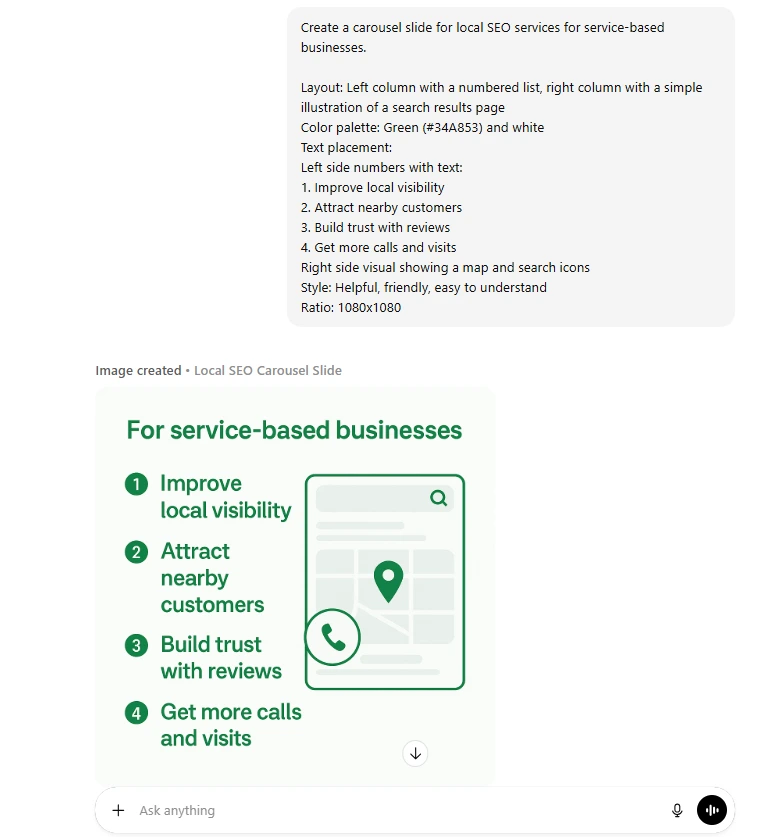
Create a carousel slide for [OFFER].
Layout: Left column numbered list, right column simple illustration
Color palette: Green (#34A853) and white
Text placement: Numbers left, text right
Style: Helpful, friendly
Ratio: 1080×1080
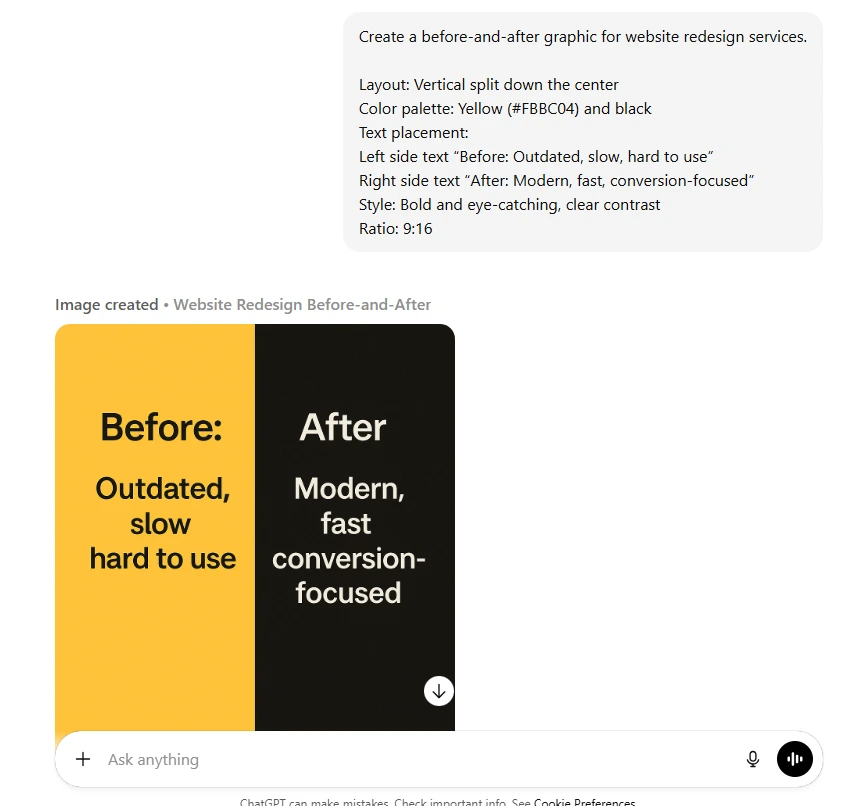
PROMPT 4 – Before/After split
Create a before/after graphic for [OFFER].
Layout: Vertical split down the center
Color palette: Yellow (#FBBC04) and black
Text placement: “Before” on left, “After” on right
Style: Eye-catching
Ratio: 9:16
PROMPT 5 – Center image + overlay
Create a promotional graphic for [OFFER].
Layout: Product image centered, text overlay at top and bottom
Color palette: Pink (#FF5F8C) and white
Text placement: Headline top center, CTA bottom center
Style: Bright and energetic
Ratio: 4:5
How small businesses can use these prompts
Just copy and paste these prompts into ChatGPT’s image generator or Gemini Nano Banana to create visuals instantly. These tools understand design instructions clearly, so the output matches your layout, mood, and messaging.
Struggling with visual content or professional design?
Wisitech delivers creative social media graphics and visuals that captivate audiences, all powered by AI and expert strategy.
Book a Free Strategy Session
Prompt 10: Short video concepts
Exact prompt
Create 6 short video ideas for [TOPIC].
Each idea:
– Has a hook
– Includes simple action
– Ends with a CTA
– Notes the length
– Suggests a basic style
– Lists props
– Suggests the music vibe
Why this helps
Video gets more reach than any other format.
This prompt offers ideas simple enough to film with a phone.
This keeps your social posting plan dynamic and engaging.
The free tool stack every small business can use
You don’t need expensive tools.
You can automate almost everything using free versions of:
- ChatGPT
- Perplexity
- Claude
- Canva
- AI image tools
- CapCut
- Google Sheets
- Native scheduling tools
This makes automation accessible for all small businesses.
Build a google sheets calendar
Prompt 11: Create the template
Create a Google Sheets layout for a complete social media calendar with the following columns:
- Date
- Platform
- Pillar
- Post type (Reel, Carousel, Static, Story, Video, etc.)
- Caption
- Image Text (short text that appears on the visual)
- CTA
- Hashtags
- Image link
- Status (Draft, In Progress, Scheduled, Posted)
- Notes
Add color coding for Status:
– Draft = Light Grey
– In Progress = Yellow
– Scheduled = Light Blue
– Posted = Green
Include clear instructions within the sheet for how each column should be filled, and ensure the layout is clean, organized, and easy for a team to follow.
Final thoughts: You Don’t need more time, you need better prompts
Most small businesses lose hours every week to content planning. But the truth is: you don’t need to hustle harder. You need a smoother system, one where AI handles the repetitive work and you bring the personality, strategy, and human touch.
With the prompts in this guide, you can:
- Build a full social media calendar in hours
- Create consistent content without stress
- Make visuals on a zero budget
- Repurpose everything across platforms
- Free up time for the work that actually grows your business
Your audience isn’t waiting for perfection.
They’re waiting for consistency, and now you can deliver it.
Scale your social media effortlessly with wisitech’s AI boost

If you’re searching for social media marketing services in the USA that actually move the needle, we’re here to make your life easier. At Wisitech, we blend strategy, storytelling, and smart automation to help you show up consistently, without spending endless hours creating content. From calendars to captions to scroll-stopping visuals, we handle the heavy lifting so you stay focused on running your business.
Our AI social media marketing services in the USA take your growth even further. We use real insights, trend-driven ideas, and platform-smart execution to help your brand stand out and convert followers into customers. No guesswork, no chaos, just a clean, predictable system that works.
Get your free consultation, and let’s build your next month of content together.
Want results, not just ideas?
Wisitech combines human strategy with AI precision to drive measurable growth across web, social, and digital channels.
Let’s Talk – Free Consultation